
[Note: This will be the last of a short series of posts centered on hardware for writing. A new series, starting soon, will take up more direct writing- and editing-centered concerns.]
In the last installment of this blog, I outlined my creation of a portable digital device for distraction-free (or at least distraction-minimized) writing, utilizing an older (but still pretty modern) laptop.
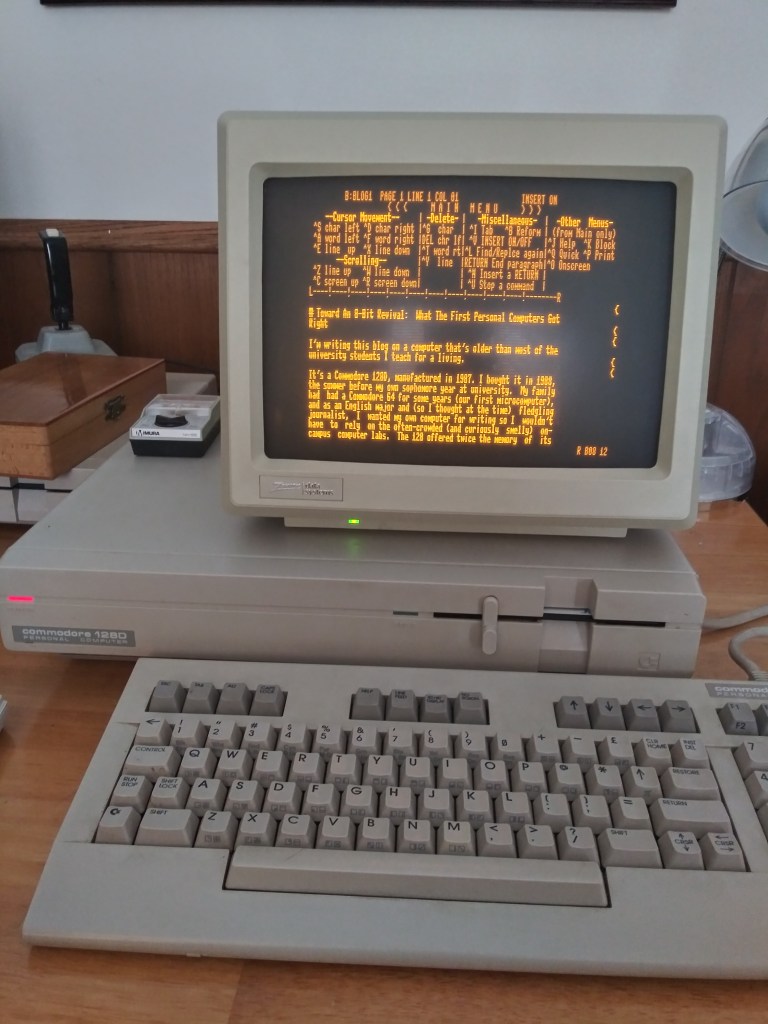
This post outlines another somewhat quirkier solution. In this case, I am composing this post–no joke–on my Commodore 128D, a 1987-vintage 8-bit microcomputer.
The machine I used for this project is the result of a hobby I got into a few years ago when I was quarantined, like everyone else, during the COVID-19 pandemic. I’d been reading a few articles about the growing hobby of retro computing and viewing a wonderful series of YouTube videos posted by the knowledgeable (and extremely friendly) uber-hobbyist David Murray, also known as The 8-Bit Guy. Those videos had me waxing nostalgic about some of the games and hardware I used back in the late 80’s and early 90’s. Then I remembered that one of my old machines–this very Commodore, which I purchased in the summer of 1988 for writing my undergraduate college papers–was still in my possession and probably still in good shape, having spent the last thirty years safely stored in its original box under the stairs in my parents’ basement. So, I dug it out, along with the peripherals and software that had survived along with it, just to see if it would still power on.
Once I’d confirmed that, I had to go online to find a replacement for the original Magnavox amber monochrome CRT I’d used with it years ago, which had been given away at some point. I was unable to find a duplicate of that monitor, but did find an old Zenith amber CRT that fit the bill nicely without being too expensive. I took everything home, set it up, and embarked, at first, on an enjoyable nostalgia trip, resurrecting games I’d spent many hours enjoying back in the day and even browsing through the many floppy disks full of papers, stories, and poems I’d written in my college years (some of which were downright embarrassing to revisit, but it was fun just the same).
Even as I was still in full-on nostalgia mode, though, I began to wonder whether this old hardware could be used for purposes beyond mere nostalgia. Might there be ways an 8-bit microcomputer from the 1980s could be made useful for real, daily work and fully relevant to the present?
I immediately thought back to the purpose for which I’d bought the thing in the first place: writing. It had always served me well in that capacity back in the day, after all, and it held many of the qualities that many have had to re-create in order to achieve less-distracting computing in the present: it wasn’t (naturally) designed to be connected to the internet; it was designed to run only one app at a time using a minimal, mostly text-based interface, and I remembered that I’d always loved that amber monochrome CRT monitor, even though color monitors were certainly available at the time since its warm-but-muted glow and shading were much easier on the eyes than the color monitors of the time for long writing sessions.
My first try at using the 128 as a present-day writing machine involved simply going back to the word processing software I originally used, a program called “Word Writer 128.” While I found that program as easy to use and as perfectly adequate for composing as I ever had, two things got in the way: for one, there was no easy, direct way to transfer files from that computer to a more modern one. For another, the file format used by Word Writer 128 was proprietary, meaning that there was no decent way to convert those files to a format readable by a modern word processor or text editor. So, while Word Writer may have been adequate, say, for personal journaling that I would only ever access on the 128, it wouldn’t work for writing for any other purpose.
As I researched the issue further, however, I found that the vibrant hobbyist community around these older computers has been hard at work developing creative ways to make them more usable in the present. One such development was crucial for me: a few very technically-minded users had developed devices called “wi-fi modems” that solved the basic file transfer problem.
For you post Gen-X-ers out there, explaining this will take a small history lesson: most early microcomputers had ports that accepted an add-on device called a “modem.” While the internet was not yet around (save in very incunabular, text-only form), a modem would allow one to connect to other computers, as well as pre-internet online communities known as Bulletin Board Services (think of these localized “mini-internets,” each with its own limited number of users) by dialing into them over a standard telephone landline. These were, in essence, the original online social networks). What a modern “wifi modem” does, essentially, is plug into the modem port on an older computer and “trick” the computer into thinking it’s got an old-style modem connected to a phone line–when, in reality, it’s actually accessing your entirely-modern home wifi network. This gives those older computers basic modern networking and internet functionality, including the ability to easily transfer files to other computers on one’s home network. (My wifi modem comes from a one-person outfit called commodore4ever.)
With a wifi modem up and running so I could transfer files easily, I then had to tackle the file format problem. Initially, I did this by taking advantage of an interesting feature of the Commodore 128D that even many of its original uses never knew about or used. Explaining this also requires a little history: back when the 128D came out, Commodore’s predecessor product, the Commodore 64, had become the best-selling microcomputer of all time, offering, in many ways, significantly more functionality than its competitors (such as the Apple II series and early MS-DOS based PC’s) at a much lower cost. For that reason, the 64 was instrumental, historically speaking, in making computers household items. While the Commodore 64 had effectively captured the home market, Commodore wanted the successor to the 64, the Commodore 128 (and its close but slightly later cousin, the 128D), to be competitive in the business market as well. At the time, the operating system favored by most business-oriented computers was one called CP/M. MS-DOS, at the time, was an upstart competitor to CP/M, though that would soon change (another interesting story in itself). So, Commodore decided that the 128, in addition to running its native Commodore Basic operating system, would also run CP/M, via the inclusion of a second, entirely different processor, known as a Z80, on the motherboard. This was a pretty wild idea, and something that’s never really done anymore. Imagine a computer manufacturer nowadays creating a single machine that, within its electronic innards, contained the hardware that would allow you to run it as either a PC or a Mac at your choice. While, alas, the 128 still never really caught on as a business machine, the capability remained, enabling the computer to run, among other things, one of the most popular word-processing apps of the day, known as WordStar.
This is where we return to my file compatibility problem: While there was no way to convert files from my old Commodore-centric word processor to modern formats, there are, it turned out, easy ways to do that with the format used by WordStar. Wordstar also happens to have a lot more functionality as a word processor than the basic tool I’d used back in college.
So, having found a copy of WordStar for CP/M on the very modern internet and using my trusty new wifi modem to transfer those files to my Commodore and write them into CP/M formatted floppy disks, I was able to start composing in WordStar. It didn’t hurt that I’d read a few articles stating that WordStar was the word processor of choice of George R.R. Martin, author of the popular Game of Thrones series of novels. The article mentioned that one of the reasons he continued to use WordStar (in his case, on an old DOS-based machine) was the way it promoted focus through a combination of the lack of multitasking and an internet connection. (I imagine, too, that it was a security thing for Martin–when every tech-savvy journalist/hacker is out there trying to get ‘hold of an advance copy of his draft of the latest GoT novel, the safest possible move would be to draft it on a computer that doesn’t connect to the internet at all!)
I continue to use my 128D with this setup, especially for more personal writing (like personal journaling) that I’d rather keep secure and completely inaccessible to hacking or other security issues that come with a normal internet connection. The only time the computer in this configuration is connected to a network is when I enable my Wi-Fi modem to transfer files from the native floppy disk storage media over my home network to one of my modern machines.
An Alternative Route
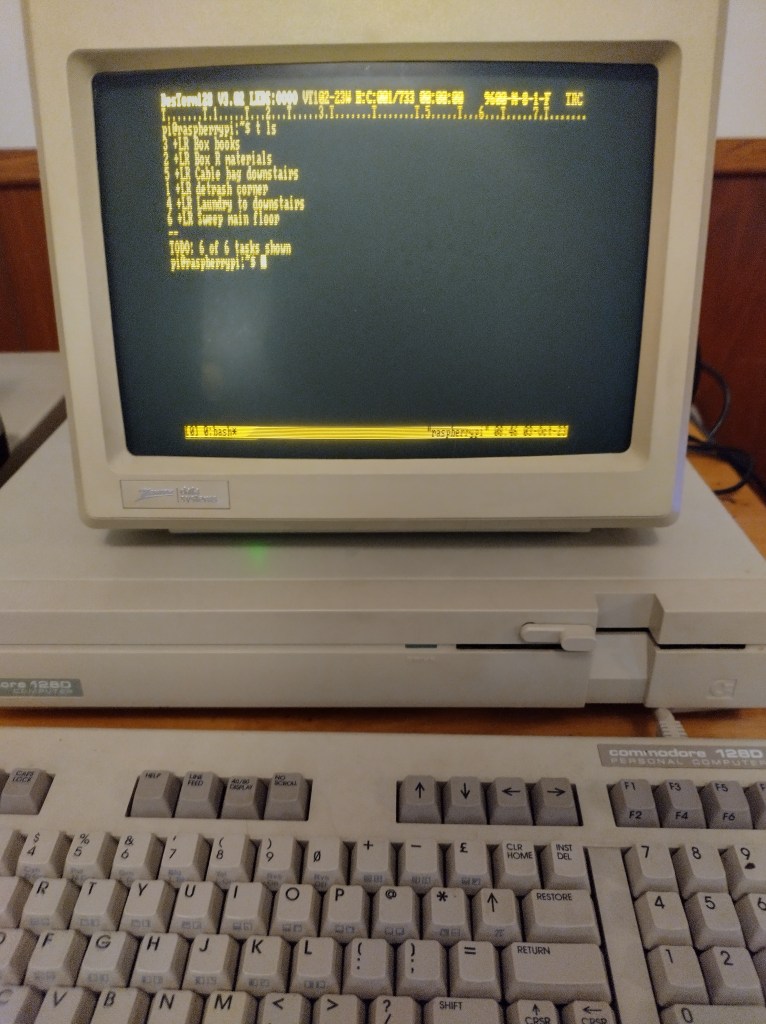
While the above setup works well, I still wondered if there might be an easier way to deal with both the file transfer and compatibility problems. Another solution occurred to me when I learned that it was possible to run a terminal app on my commodore, essentially enabling it to act as a text-based interface for one of the other modern computers on my network. I have, on my home network, a small, inexpensive computer called a Raspberry Pi that I use primarily as a connected storage device for certain kinds of data (as well as a server for an old but reliable HP laser printer). It runs a very lightweight version of the Linux operating system and uses very little power. So, with a good secure setup, it’s a great way of securely storing personal files that allows me to access those files from basically any computer, anywhere, without leaving an electricity-sucking desktop machine on all day. Without getting too technical with the explanations, there is a piece of software I can run on my old Commodore that essentially allows me to connect with that Raspberry Pi computer and interact with it in a text-only interface. In other words, I’m typing on my Commodore but actually interacting with that small Linux computer over my network. I mentioned in my previous post that I like using an app called Vim for composing, and Vim runs natively in a Linux terminal. In that way, I am able to connect my Commodore to that Linux computer and write in Vim. Any files I write using that setup are automatically available to the rest of my home network, and since Vim uses a plain-text file format, the files I generate are readable by just about any editor or word processor out there.
This terminal setup is what I use for most of my everyday composing. My Commodore 128D lives in the same room as my main writing/editing workstation, so it’s easy to go into focused composition mode by simply turning off my workstation, firing up the Commodore 128, and writing away without distraction from texts or emails.
Obviously, in this post, I’ve merely described what I’ve set up without going into the techy details of how I did so. The idea here has been simply to point out yet another solution for distraction-free digital writing and to suggest that even much older computers can be repurposed to do real work in the present.
If you’re interested in the technical aspects of how to create one or both of these setups, I’ve documented the process for both over at my experimental tech blog, unvarnishedgeek.github.io. Here’s the article on setting up a Commodore 128 to run WordStar for CP/M, and here’s the one on setting up the Commodore 128 as a Linux terminal.
I’m happy with both solutions, as they help me get daily work done while scratching my nerdy retro-computing itch at the same time.
As always, I’m willing to help out with questions about creating such a setup for yourself and interested in suggestions about improving upon the ideas I’ve laid out here. Feel free to leave those questions and suggestions in the comments!
 Bruce Editing Services